
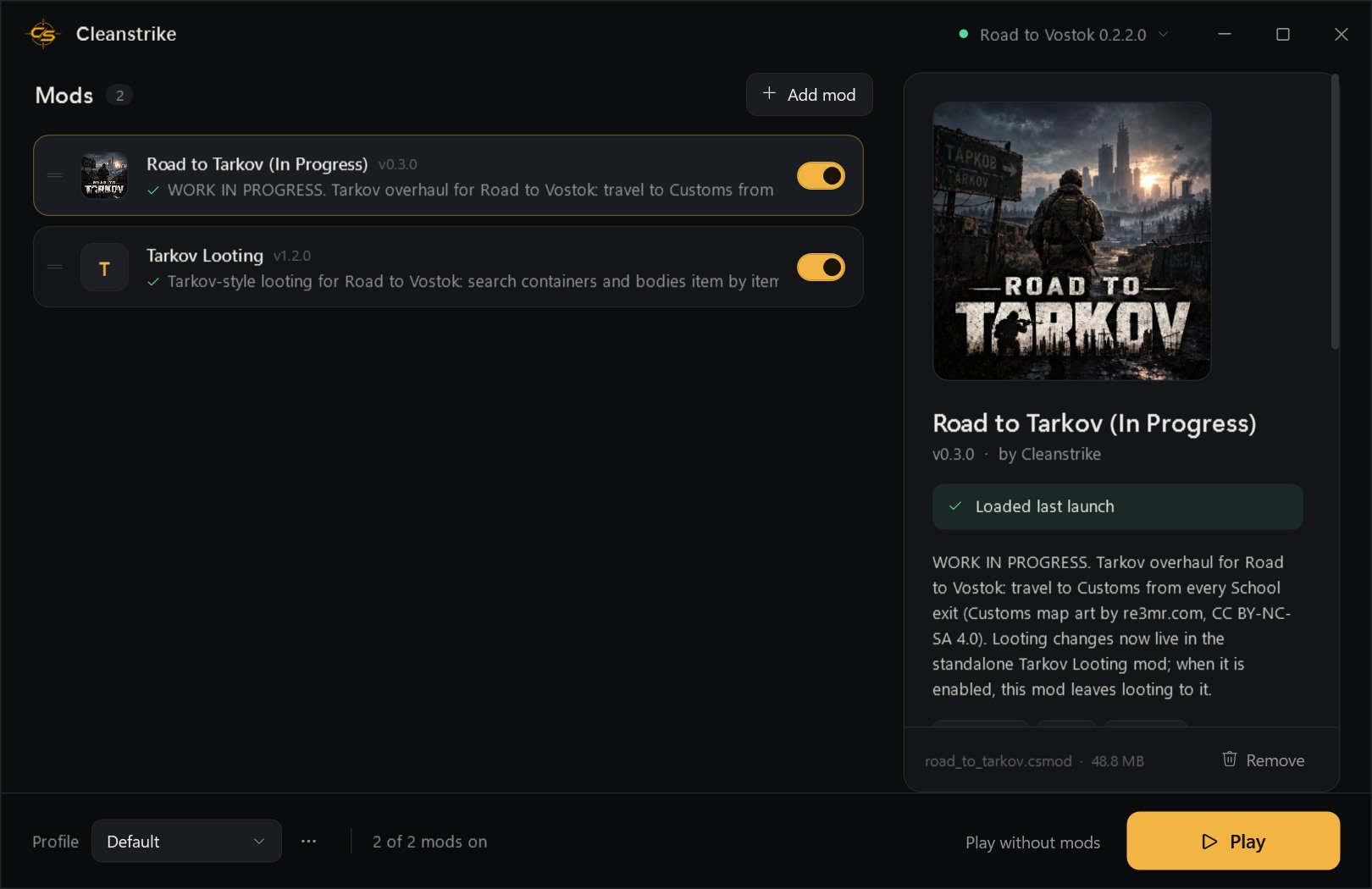
Road to Vostok mod manager

Mod Vostok.
Raid like Tarkov.

Cleanstrike is the one-click mod loader and manager for Road to Vostok. Drop mods in, press Play. No file juggling, no broken installs, no fear for your saves.

—raiders have
downloaded Cleanstrike

Latest release · GitHub

CLEANSTRIKE ✦ ROAD TO VOSTOK ✦ TARKOV LOOTING ✦ SEARCH ✦ EXAMINE ✦ EXTRACT ✦ CLEANSTRIKE ✦ ROAD TO VOSTOK ✦ TARKOV LOOTING ✦ SEARCH ✦ EXAMINE ✦ EXTRACT ✦ CLEANSTRIKE ✦ ROAD TO VOSTOK ✦ TARKOV LOOTING ✦ SEARCH ✦ EXAMINE ✦ EXTRACT ✦ CLEANSTRIKE ✦ ROAD TO VOSTOK ✦ TARKOV LOOTING ✦ SEARCH ✦ EXAMINE ✦ EXTRACT ✦

Built for the zone

Gear up in seconds.

One portable app. Run it from anywhere and it finds your game on its own.

Finds your game

Scans Steam and every library folder automatically. Or point it at the game yourself.

Drag, drop, play

.csmod, .vmz, .zip, .pck. Badly packaged mods are repaired on install.

Load order & profiles

Drag to reorder, toggle mods on and off, and keep separate loadouts.

Safety nets

Incompatible mods are held back, broken ones roll back alone, and two crashed boots start the game clean.

Per-mod settings

Every mod's options in one clean panel. No config files to hunt down.

Launch report

After every raid, see which mods loaded, and if one didn't, why, in plain language.

The Cleanstrike app

Deploy

Three steps to the raid.

  1. Download CleanstrikeA single portable .exe. Nothing to install.
  2. Drop your mods inDrag files onto the window or click Add mod.
  3. Press PlayCleanstrike wires itself into the game and launches it. Remove it any time with one click. It keeps itself up to date.

From the Cleanstrike workshop

Tarkov, brought to Vostok.

Our own mods, built to feel native to the game.

Premium · New

Road to Hell

Vostok becomes a zombie survival game. Every enemy is replaced by the dead, and they hunt by sound.

  • Hunt by sound: a gunshot carries 140 m, and a zombie that spots you calls only the nearby dead, not the whole map
  • Limbs come off fast under fire; legless zombies keep coming as crawlers
  • Slow and tough, but every blow hurts, and some charge when shot
  • Doors give way after ten blows; bodies can hold a few rounds or food
  • Off by default: switch it on in Cleanstrike when you're ready
Premium · New

CleanStrike Weapons Pack

Nine new guns that handle like the game's own: found in loot, with their own magazines and ammo, and the game's attachments.

  • FN SCAR-17, Barrett M82A1, ASh-12, Ruger Mini-14, KRISS Vector, FN P90, Desert Eagle, Welrod and a homemade Ray Gun
  • New calibres sold by the Gunsmith: .50 AE, .50 BMG, 12.7×55, 5.7×28 and Plasma Cells
  • A silent bolt-action Welrod the zombies never hear; a Ray Gun that fires glowing plasma bolts
  • Optional: start new games with every gun and its ammo
Premium

Tarkov Looting

Every container is a gamble. Search it item by item and find out what you've got.

  • Containers and bodies searched one item at a time
  • Unknown items are silhouettes until you examine them (middle-click)
  • Weapons and mags work before you examine them
  • Tarkov-style colour-coded cells
In progress

Road to Tarkov

A full Tarkov overhaul for Road to Vostok, starting with a full-scale Customs.

  • Travel to Customs from every School exit
  • Tarkov's playable bounds and extracts
  • Customs map art by re3mr.com (CC BY-NC-SA 4.0)

Plus 43 more, all included with Cleanstrike and switchable one by one:

Is it safe?

Not a virus. Here's the proof.

Windows may show a blue SmartScreen box the first time you run Cleanstrike, and a few antivirus tools may flag it in the days after a fresh release. That's a false positive. Here is exactly why it happens — and why the app is safe.

"Unknown publisher"

Cleanstrike is a free, independent app without an expensive code-signing certificate. SmartScreen warns about any new, unsigned app until enough people have run it. The warning is about reputation, not about anything the app does.

Why antivirus pings it

It's one portable .exe that carries the whole .NET runtime inside it, unpacks to a temp folder on launch, then reads the Steam registry to find your game. Generic heuristics flag that self-extract-and-scan shape — the same reason many honest game tools get tagged. It's a guess from the file's shape, not a real detection of anything malicious.

Run it anyway

On the blue SmartScreen box, click More info, then Run anyway. You only do this once. As each release is downloaded more, the warning stops appearing for everyone.

Check for yourself

Cleanstrike is fully open source. Read every line on GitHub, build the identical .exe yourself, or drop the download on VirusTotal — you'll see only a couple of heuristic engines guess, never a named, agreed-upon threat.

The short version: an unsigned, self-contained Windows app that scans your drives to find a game looks, to an automated scanner, a lot like something it shouldn't — so it warns just in case. Nothing in Cleanstrike collects your data, touches your files outside the game, or talks to anything but GitHub for updates. Click More info → Run anyway and raid on.

Ready to drop in?

Get Cleanstrike.

Free, portable, and safe for your saves.